
Data Enrichment
Watch your network's companies for transactions, leadership changes, capital raises and news — and have it land as a CRM note on the company's timeline.
What is Data Enrichment?
Data Enrichment watches the companies in your network for transactions, leadership changes, capital raises and news. Propstreet searches the public web every few days, and anything that looks relevant lands as a CRM note on the company's timeline with the source linked.
What is monitored?
Data Enrichment looks for acquisitions and dispositions (property transactions the company has completed), leadership changes (new CEOs, board changes), capital raising (fund rounds, new mandates), development projects (new construction projects) as well as partnerships and market movements (expansion into new markets, strategic changes).
Each finding is classified with a signal type and a relevance score for commercial real estate, so the most relevant news appears first.
Enable Data Enrichment
Open a company in the network view. In the side panel you will find the Data Enrichment toggle under Data Enrichment. Turn it on — the system starts monitoring the company immediately.

Company settings
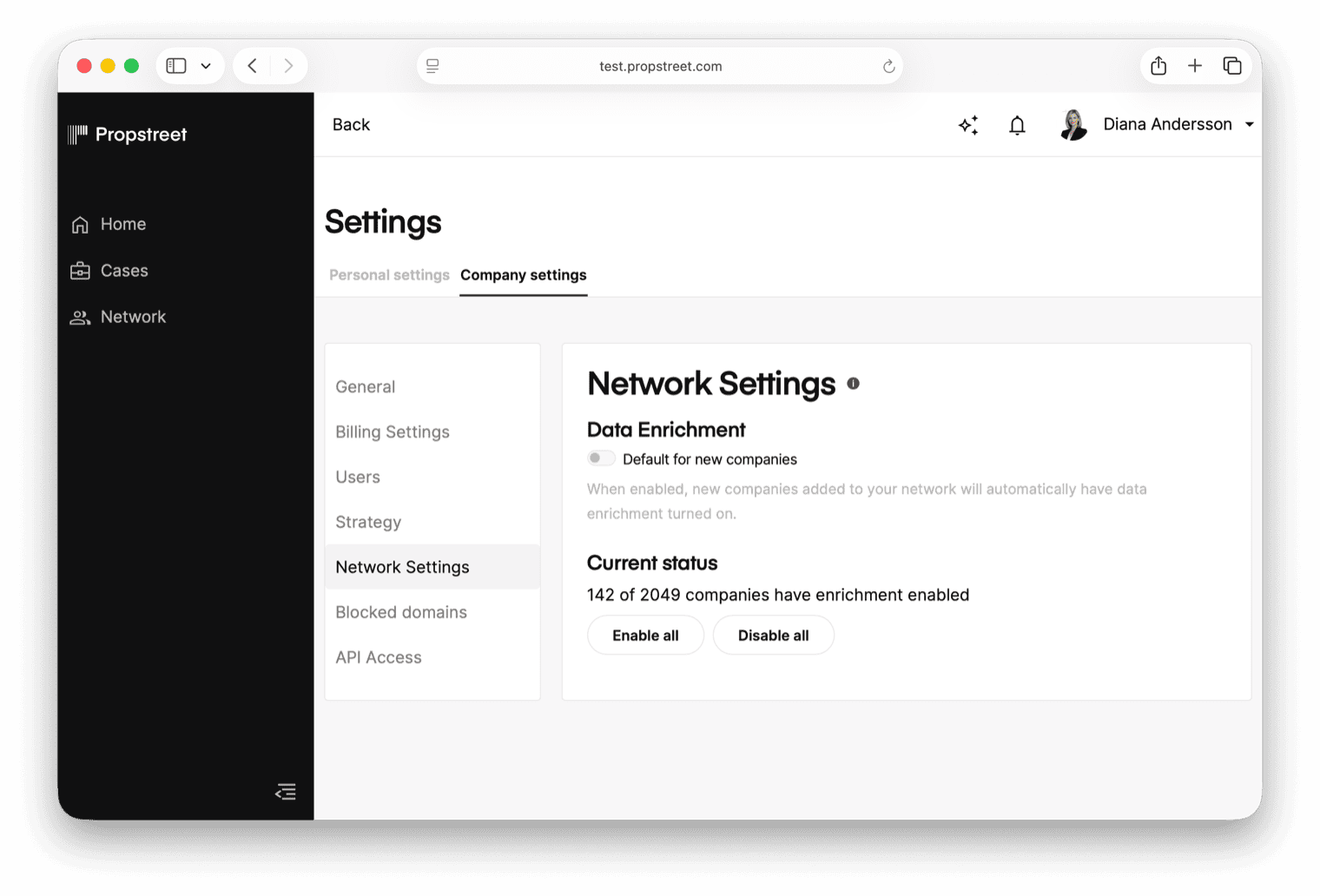
If you have many companies in your network, enabling Data Enrichment one company at a time can be tedious. Under Company Settings > Network Settings you will find tools for managing Data Enrichment across your entire network at once.
Default setting for new companies
Enable automatic Data Enrichment for all newly added companies — whether added manually, via API or import. New companies will then get monitoring right away without you having to turn it on manually.
Enable or disable for the entire network
With one click you can turn Data Enrichment on or off for every company in the network. The page shows live metrics of how many companies have monitoring enabled compared to the total. Changes take effect immediately — the network sidebar updates in real time without requiring a page reload.
What do you see?
When the system finds relevant news or events, a note is automatically created in the company's timeline. The note is written in your language (the system translates automatically), includes a summary of the news and cites the source with a link to the original article.
Each note is categorized by type (e.g. acquisition, disposition, leadership), making it easy to quickly see what type of event it is.

Monitoring frequency
The system runs automatically on a daily basis. If new news was found recently, the next scan runs after 2 days. If no news was found, the next scan runs after 3 days. You do not need to do anything manually — everything happens automatically in the background.
Turn Data Enrichment on for the active investors and potential buyers you'd otherwise be googling once a fortnight. Lets the news come to you instead of the other way around.
- Data Enrichment automatically monitors news and transactions for companies in your network
- Enable per company with the toggle in the side panel, or for the entire network via Company Settings
- Relevant findings are automatically added to the company's timeline as CRM notes
- Monitoring runs automatically every 2–3 days without any manual effort
Start with the twenty investor companies you'd be unhappy to learn had announced a new fund without hearing about it. Enable Data Enrichment on those first; expand once you trust the signal-to-noise.